> For the complete documentation index, see [llms.txt](https://docs.coin98.com/llms.txt). Markdown versions of documentation pages are available by appending `.md` to page URLs; this page is available as [Markdown](https://docs.coin98.com/products/coin98-super-wallet/extension-1/beginners-guide/sync-mobile-with-extension.md).

# How to synchronize Coin98 Super Wallet with Coin98 Extension

### Exporting Private Key/Seed Phrase from Coin98 Super Wallet <a href="#docs-internal-guid-bf268995-7fff-8e21-82d3-fec3e7ccd80b" id="docs-internal-guid-bf268995-7fff-8e21-82d3-fec3e7ccd80b"></a>

Private Key/Seed Phrase must be saved in a safe place when users create wallets on Coin98 Super Walet. You can copy your backed-up Private Key/Seed Phrase and move on to the next step.

However, if you accidentally deleted, or forgot your keys, then here’s how to retrieve them on Coin98 Super Wallet:

{% embed url="<https://docs.coin98.com/products/coin98-super-wallet/mobile/wallet-management/how-to-show-seed-phrase-private-key>" %}

## Restoring wallets on Coin98 Extension&#x20;

Now, the most important part of this guide:

**Step 1:** Open Coin98 Extension;

**Step 2:** Click **Restore Wallet** on the initial screen;

**Step 3:** Set up a password if you haven’t done it yet. Choose between 2 options:

* Matrix Password;
* Text Password.

**Read more at** [**How to install Coin98 Extension Wallet for Google Chrome**](https://docs.coin98.com/products/coin98-wallet/extension/beginners-guide/install-extension-google-chrome)

![](https://2549780185-files.gitbook.io/~/files/v0/b/gitbook-x-prod.appspot.com/o/spaces%2FirKWZRA5WMZ5uBeDGB96%2Fuploads%2F7cZWYwLtXm87defYTJqV%2Fext-initial.png?alt=media\&token=9fe0cc90-73b1-43eb-aea5-323a7f3007a5)

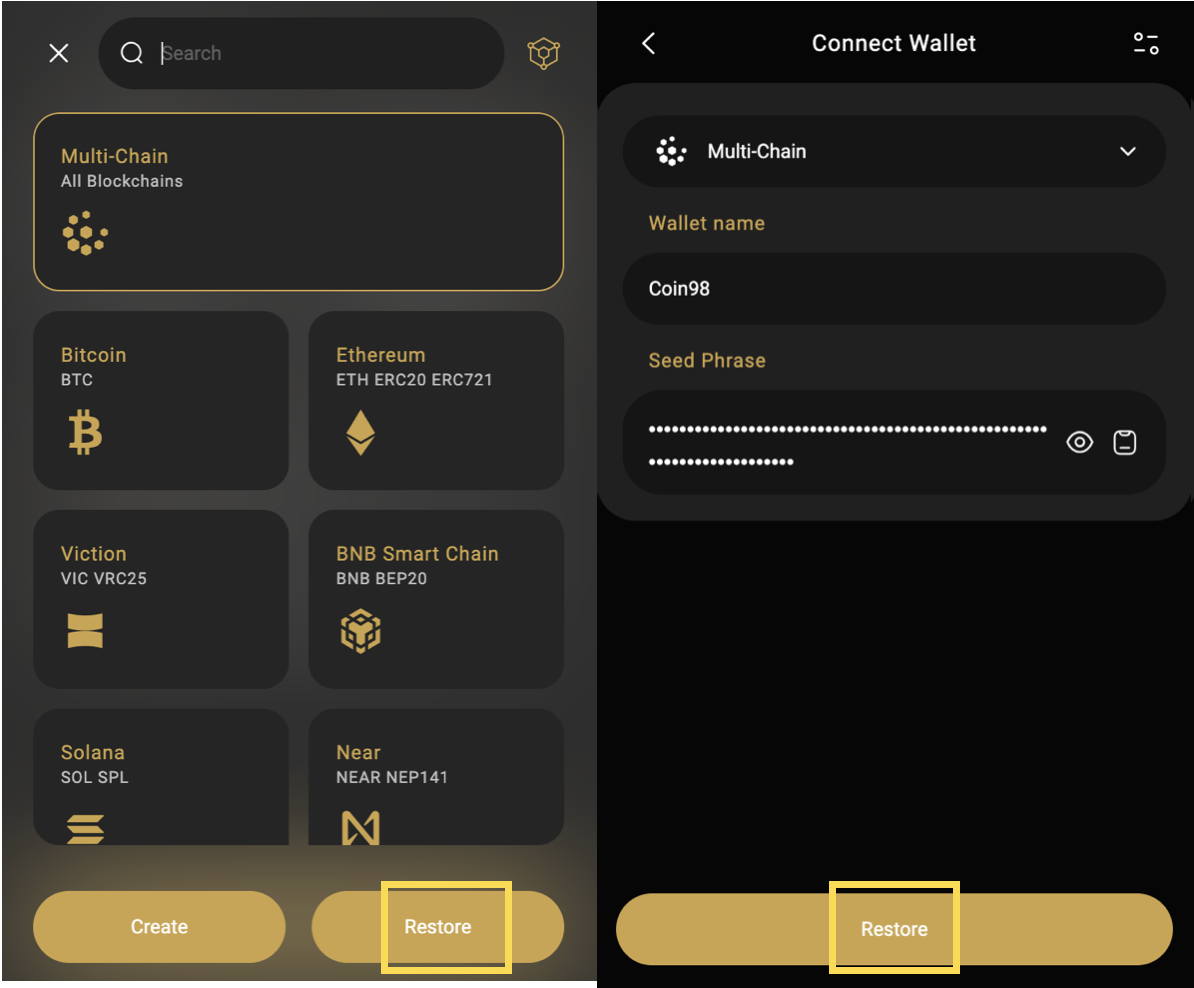
**Step 4:** After setting up the password, choose the icon that matches the wallet you want to restore (**Multi-Chain** is recommended);

**Step 5:** Name the wallet, enter or paste the Private Key or Seed Phrase to restore;

<figure><img src="https://2549780185-files.gitbook.io/~/files/v0/b/gitbook-x-prod.appspot.com/o/spaces%2FirKWZRA5WMZ5uBeDGB96%2Fuploads%2FSpykYyLAtbBQDe5YL698%2FScreenshot%200005-11-28%20at%2016.23.20.png?alt=media&amp;token=73365ced-58b7-4d9b-bb39-274641522313" alt=""><figcaption></figcaption></figure>

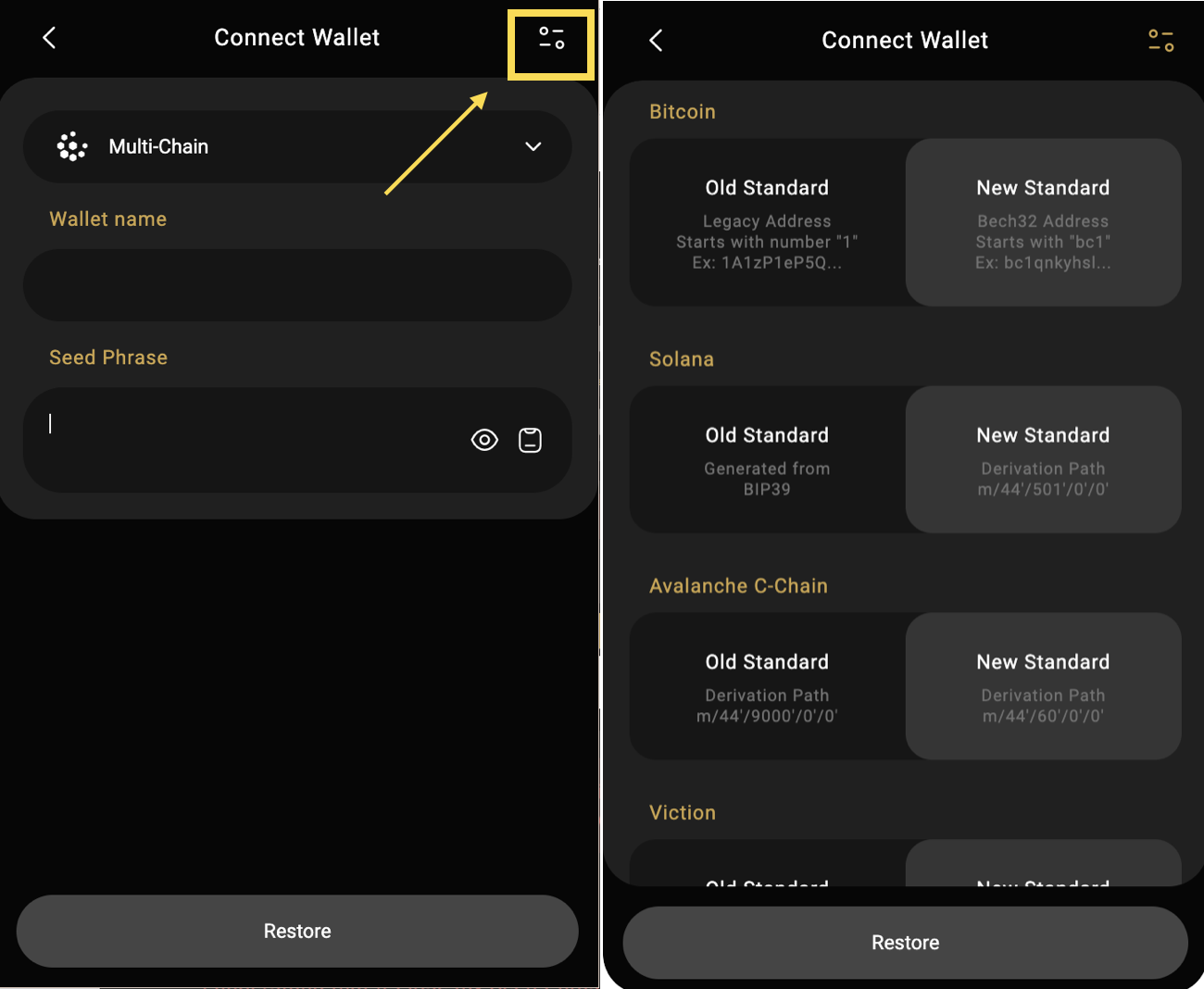
**Step 6:** Select wallet standards. **In each standard wallet option, you need to determine which standard you are importing to make the right choice.**

Coin98 Extension supports both New and Old Standard recovery for wallets on Bitcoin, Solana, Avalanche C-chain, Viction (formerly Tomochain), Celo, Injective, The Open Network, Persistence, Tron, Aptos (Mainnet/Devnet and Testnet).

**Step 7:** Click **Restore** to complete.

<figure><img src="https://2549780185-files.gitbook.io/~/files/v0/b/gitbook-x-prod.appspot.com/o/spaces%2FirKWZRA5WMZ5uBeDGB96%2Fuploads%2FSu9UVQbrKa43h6AoDbJV%2FScreenshot%200005-11-28%20at%2014.28.04.png?alt=media&amp;token=9f65f8ef-247b-4062-a665-c314d1a35a1e" alt=""><figcaption></figcaption></figure>

By completing these simple steps, you have successfully synchronized your Coin98 Super Wallet with your Coin98 Extension. Manage your assets anytime, anywhere with both our versions from now on!
---

# Agent Instructions
This documentation is published with GitBook. GitBook is the documentation platform designed so that both humans and AI agents can read, navigate, and reason over technical content effectively. Learn more at gitbook.com.

## Querying This Documentation
If you need additional information that is not directly available in this page, you can query the documentation dynamically by asking a question.

Perform an HTTP GET request on the following URL with the `ask` and `goal` query parameters:

```
GET https://docs.coin98.com/products/coin98-super-wallet/extension-1/beginners-guide/sync-mobile-with-extension.md?ask=<question>&goal=<user_goal>
```

`ask` is the immediate question: it should be specific, self-contained, and written in natural language.
`goal` is what the user is ultimately trying to achieve, the reason they need the answer. Sharing it helps GitBook give you a better, more relevant answer. A goal is most helpful when it describes the outcome the user wants rather than restating the question. For example, with `ask=how do I create an API token`, a goal like `build a script that syncs our docs to a CMS` lets GitBook tailor the answer to that use case.

The response will contain a direct answer to the question and relevant excerpts and sources from the documentation.

Use this mechanism when the answer is not explicitly present in the current page, you need clarification or additional context, or you want to retrieve related documentation sections.
