> For the complete documentation index, see [llms.txt](https://docs.coin98.com/llms.txt). Markdown versions of documentation pages are available by appending `.md` to page URLs; this page is available as [Markdown](https://docs.coin98.com/products/coin98-super-wallet/extension/wallet-management/how-to-use-watch-only-wallet-1.md).
# How to use Watch-only Wallet
## What is the Watch-only Wallet feature?
A watch-only wallet within Coin98 Extension serves as a read-only representation of a cryptocurrency wallet. It allows you to observe the wallet's balance and transactions without the ability to initiate transactions or access private keys. This feature is often utilized for the purposes of enhanced security and monitoring.
## How to add a Watch-only Wallet
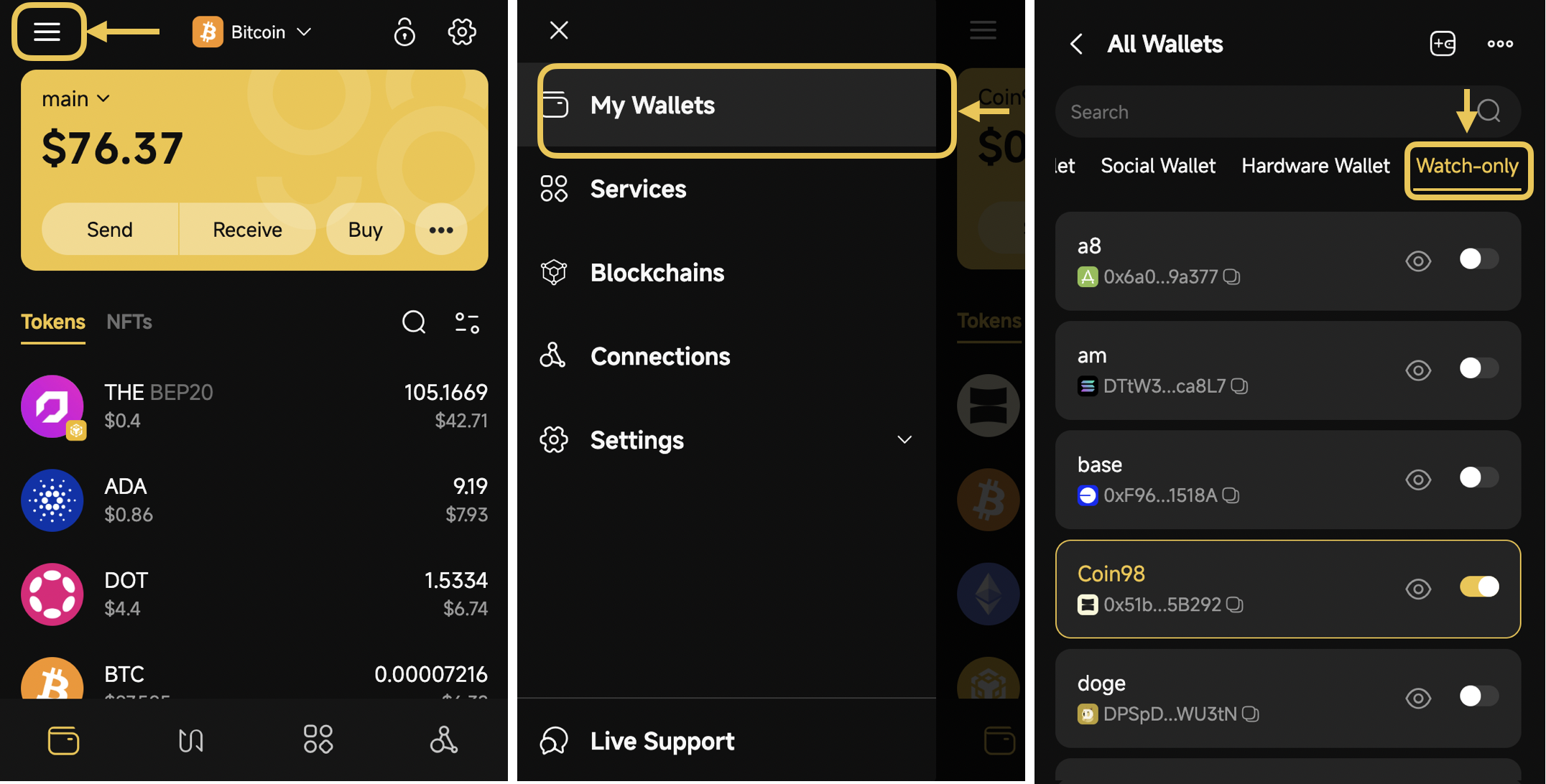
**Step 1**: On the main screen of the Coin98 Extension, click the icon at the top left corner to access the sidebar section
**Step 2**: Click **My Wallets**, then click on the Add Wallet icon at the top right corner
**Step 3**: Select **Watch-only** → then click **Continue**
**Step 4**: Choose the Blockchain, the Name of the Wallet, and input the wallet address that you want to observe -> then click **Next**.
{% hint style="warning" %}
**Note**: Please ensure that you input the accurate address associated with the correct blockchain. Failing to do so will result in an inability to proceed to the next step or monitor the desired wallet's balance.
{% endhint %}
**Step 5**: After successfully adding the Watch-only wallet, you will be navigated back to the Wallet main screen with the recently created Watch-only wallet.
## How to manage a Watch-Only wallet
* To conveniently manage all watch-only wallets on your Extension, simply click the “Watch-only” category within the Wallet Management section.
* If you have multiple wallets with the same blockchain on the Extension, you can only enable one wallet in the All Wallets section.
## FAQs
#### Can I withdraw funds from the Watch-only wallet in Coin98 Extension?
**-> No**, since the purpose of a watch-only wallet is to exclusively monitor the funds and assets of a wallet. To access the wallet's funds, you must possess the Seed phrase or private key. Once you have the seed phrase or private key, you can restore the wallet in the same manner as a hot wallet.
---
# Agent Instructions
This documentation is published with GitBook. GitBook is the documentation platform designed so that both humans and AI agents can read, navigate, and reason over technical content effectively. Learn more at gitbook.com.
## Querying This Documentation
If you need additional information that is not directly available in this page, you can query the documentation by asking a question.
Perform an HTTP GET request on the following URL with the `ask` and `goal` query parameters:
```
GET https://docs.coin98.com/products/coin98-super-wallet/extension/wallet-management/how-to-use-watch-only-wallet-1.md?ask=&goal=
```
`ask` is the immediate question: it should be specific, self-contained, and written in natural language.
`goal` is what the user is ultimately trying to achieve, the reason they need the answer. Sharing it helps GitBook give you a better, more relevant answer. A goal is most helpful when it describes the outcome the user wants rather than restating the question. For example, with `ask=how do I create an API token`, a goal like `automate deployments from our CI pipeline` lets GitBook tailor the answer to that use case.
The response will contain a direct answer to the question and relevant excerpts and sources from the documentation.
Use this mechanism when the answer is not explicitly present in the current page, you need clarification or additional context, or you want to retrieve related documentation sections.