> For the complete documentation index, see [llms.txt](https://docs.coin98.com/llms.txt). Markdown versions of documentation pages are available by appending `.md` to page URLs; this page is available as [Markdown](https://docs.coin98.com/products/coin98-super-wallet/mobile/coin98-chat/how-to-set-up-a-quiz-gift.md).
# How to set up a Quiz Gift
### What is a Quiz Gift in Coin98 Super Wallet?
A Quiz Gift is a unique feature inside Coin98 Chat that lets you set up a gift for a community group. These Gifts can be used to connect with other members, celebrate special moments, or simply for random cases.
### What do you need before creating a Quiz Gift?
{% hint style="info" %}
Before you create a Quiz Gift in Coin98 Super Wallet, make sure you have:
* Log in with a wallet or [OneID](https://docs.oneid.xyz/beginners-guide/mobile/how-to-register-oneid-on-mobile)
* Have at least a wallet with funds in the app
* Prepare a small amount of father token for [Gas Fee](https://docs.coin98.com/products/coin98-super-wallet/faqs/gas-setting)
{% endhint %}
### How to create a Quiz Gift?
To set up a Quiz Gift in the Coin98 Super Wallet, follow the steps below:
**Step 1:** On the Home screen, click the **Coin98 Chat** icon on the bottom right corner and select the community group
**Step 2:** Click on the Menu icon on the left side of the chat box and choose **Quiz Gift**

**Step 3:** Choose a type of Quiz Gift
* Single Choice: Participants can select only 1 answer
* Multiple Choice: Participants can select multiple answers
* Short Answer: Participants have to enter the correct answer

**Step 4**: Fill in the information
First, you can choose the wallet and currency that you want to use for the Gift.

Then, make sure to go through the information below to set up the Lucky Gift:
* **Total Gift Amount**: The amount should be less than the current balance
* **Distribution type**: Equally or Randomly
* **Max. Winners:** The maximum number of winners to receive the Gift
* **Eligible DID**: Select All or specific DIDs
* **Gifting time**: The time indicates how long you will wait for participants to join before gifting
* **Lucky Dip Ratio** (only for Randomly type): Set a ratio to determine the range between the highest and lowest gift amounts compared to the average.
* Tick the box **Remember this setup** if you want to set up the same Gift for the next time.

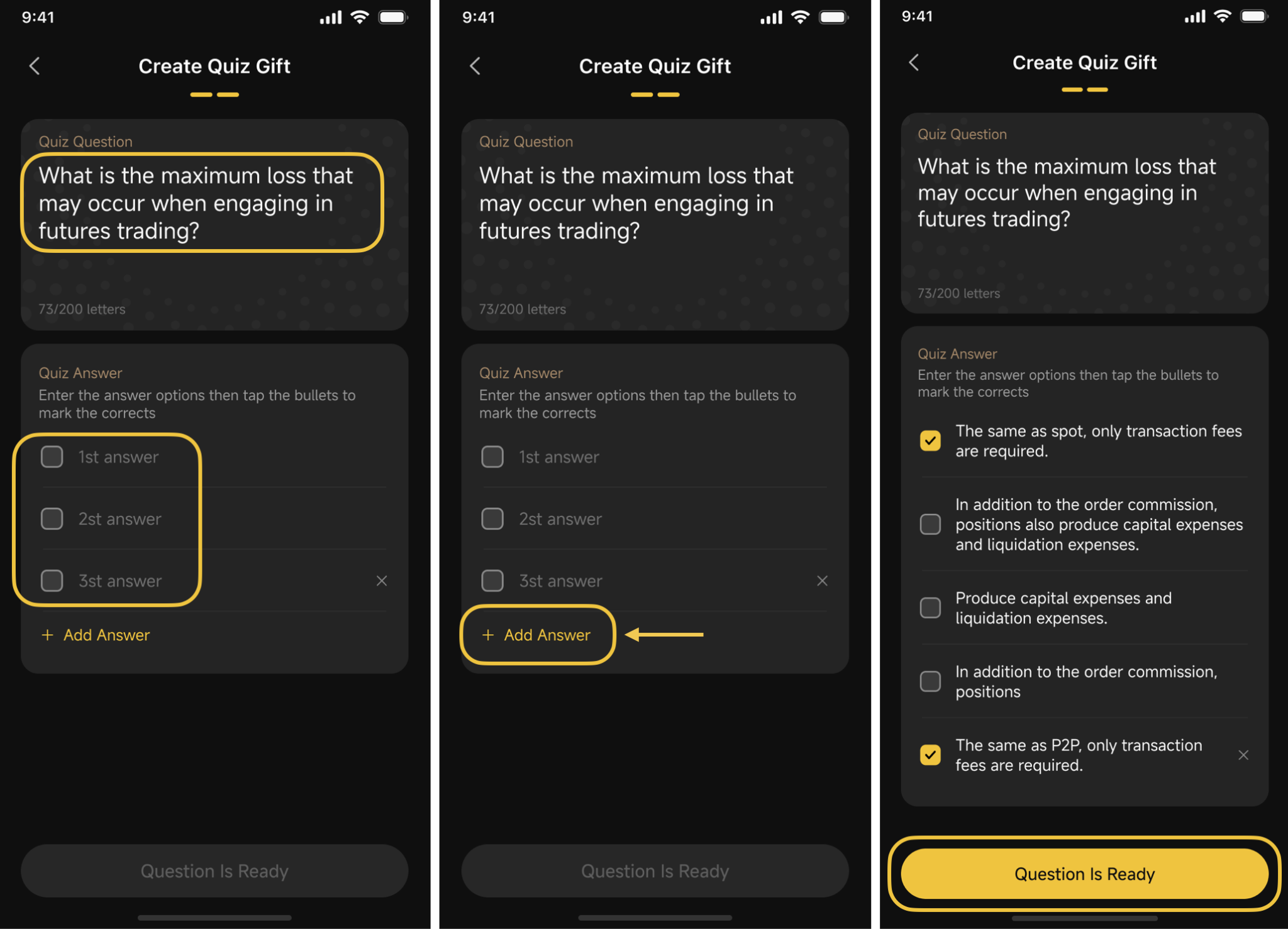
**Step 5**: Click **Setup Question** button
* Single Choice

* Multiple Choice
* Short Answer

Remember to choose/select/enter the correct answer for the quiz before clicking the **Question Is Ready** button on the bottom of the screen to complete the setup process.
**Step 6**: Review and confirm all the information
Here you can check the Gas Fee and adjust the Custom gas.
{% hint style="info" %}
Note: Make sure to prepare a small amount of father token for the gas fee.
{% endhint %}

**Step 7**: Press and hold the **Hold To Create Gift** button and wait to complete the process

All done! Now your Quiz Gift is ready and waiting for participants to join.

## How to check the result
To check the result of the Quiz Gift that you created, follow the steps below:
\
**Step 1**: In the group chat, click on the created Gift box
**Step 2**: Check the list of participants with their status and the remaining time.

## How to claim from the unclaimed gifts
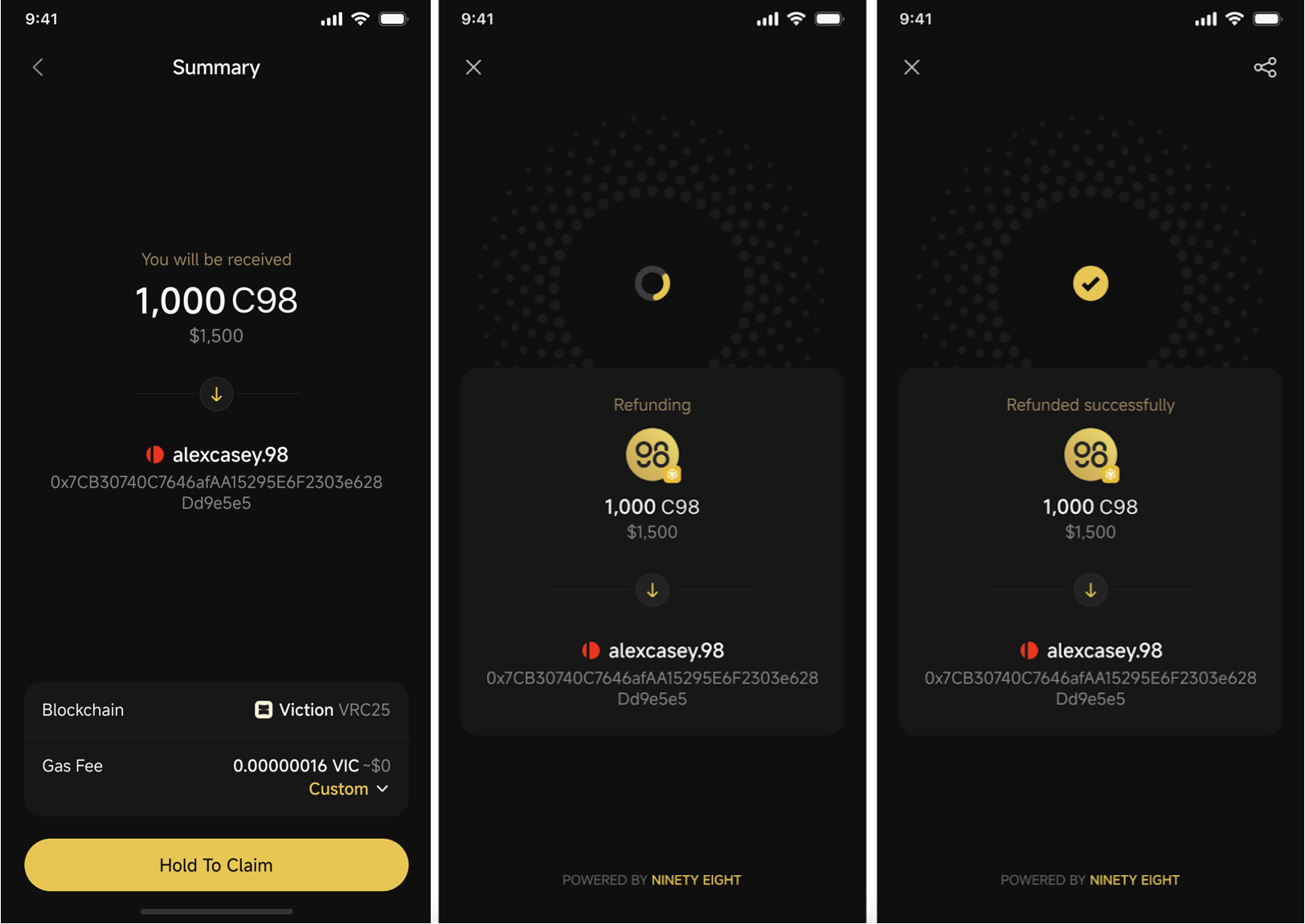
When the Gift ends but not all rewards have been claimed, you can withdraw the remaining balance back to your wallet, which is linked to your logged in OneID.
**Note:** If the linked wallet is not in the app, you need to [import the wallet](https://docs.coin98.com/products/coin98-super-wallet/switch-to-coin98-wallet/multi-chain-wallet) before withdrawing.
**Step 1**: In the group chat, click on the created Gift box and click on **Claim** button

**Step 2**: Press and hold the **Hold To Claim** button and wait to complete the process
### Frequently asked questions
#### Can I create a Quiz Gift without OneID?
No. You must be logged in with OneID to create a Quiz Gift.
#### What quiz types are available for a Quiz Gift?
Coin98 Super Wallet supports three Quiz Gift types: Single Choice, Multiple Choice, and Short Answer.
#### Can I choose who is eligible to join the Quiz Gift?
Yes. You can set Eligible DID to All or choose specific DIDs.
#### What happens if I do not have enough gas tokens?
You need enough of the chain’s native token in your wallet to pay the gas fee before you can create or claim the gift.
#### Where do unclaimed rewards go after the gift ends?
Unclaimed rewards can be claimed back to the wallet linked to your logged-in OneID. If that wallet is not in the app, you must import it first.
#### Can I reuse the same Quiz Gift setup later?
Yes. Select Remember this setup during configuration if you want to reuse the same gift settings next time.
---
# Agent Instructions
This documentation is published with GitBook. GitBook is the documentation platform designed so that both humans and AI agents can read, navigate, and reason over technical content effectively. Learn more at gitbook.com.
## Querying This Documentation
If you need additional information that is not directly available in this page, you can query the documentation dynamically by asking a question.
Perform an HTTP GET request on the current page URL with the `ask` query parameter, and the optional `goal` query parameter:
```
GET https://docs.coin98.com/products/coin98-super-wallet/mobile/coin98-chat/how-to-set-up-a-quiz-gift.md?ask=&goal=
```
`ask` is the immediate question: it should be specific, self-contained, and written in natural language.
`goal` is optional and describes the broader end goal you are ultimately trying to accomplish on behalf of the user. GitBook uses it to tailor the answer towards what is most useful for that goal.
The response will contain a direct answer to the question and relevant excerpts and sources from the documentation.
Use this mechanism when the answer is not explicitly present in the current page, you need clarification or additional context, or you want to retrieve related documentation sections.