> For the complete documentation index, see [llms.txt](https://docs.coin98.com/llms.txt). Markdown versions of documentation pages are available by appending `.md` to page URLs; this page is available as [Markdown](https://docs.coin98.com/products/coin98-super-wallet/mobile/coin98-staking/how-to-use-coin98-powerpool-on-coin98-super-wallet.md).
# How to use Coin98 PowerPool on Coin98 Super Wallet
Coin98 PowerPool is a staking feature inside Coin98 Super Wallet that lets you stake C98 on the Viction network, harvest available tokens, and unstake from the same interface.
### How to get C98 VRC25 (Viction)
To use Coin98 PowerPool, you need C98 in the VRC25 standard on Viction.
There are 2 ways to get C98 VRC25:
* **Using CEXs:** transfer C98 directly from a centralized exchange (CEX) such as Binance to a DeFi wallet through the Viction network.
* **Using Bridge:** if you already hold C98 on other chains such as Ethereum, BNB Smart Chain, or Solana, use Coin98 SwapX to convert your tokens to Viction (VRC25 standard). Check out the document below for instructions:
{% content-ref url="/pages/uj2fejYTOzUgCRElxFB6" %}
[How to convert tokens on SwapX?](/products/coin98-super-wallet/mobile/swapx/convert-tokens.md)
{% endcontent-ref %}
## How do you stake C98 on Coin98 PowerPool?
{% hint style="info" %}
* Currently, Coin98 PowerPool supports staking C98 VRC25 on the Viction network.
* When you stake, unstake, or harvest on the Viction network, Coin98 PowerPool provides Zero Gas Fee support for those transactions.
{% endhint %}
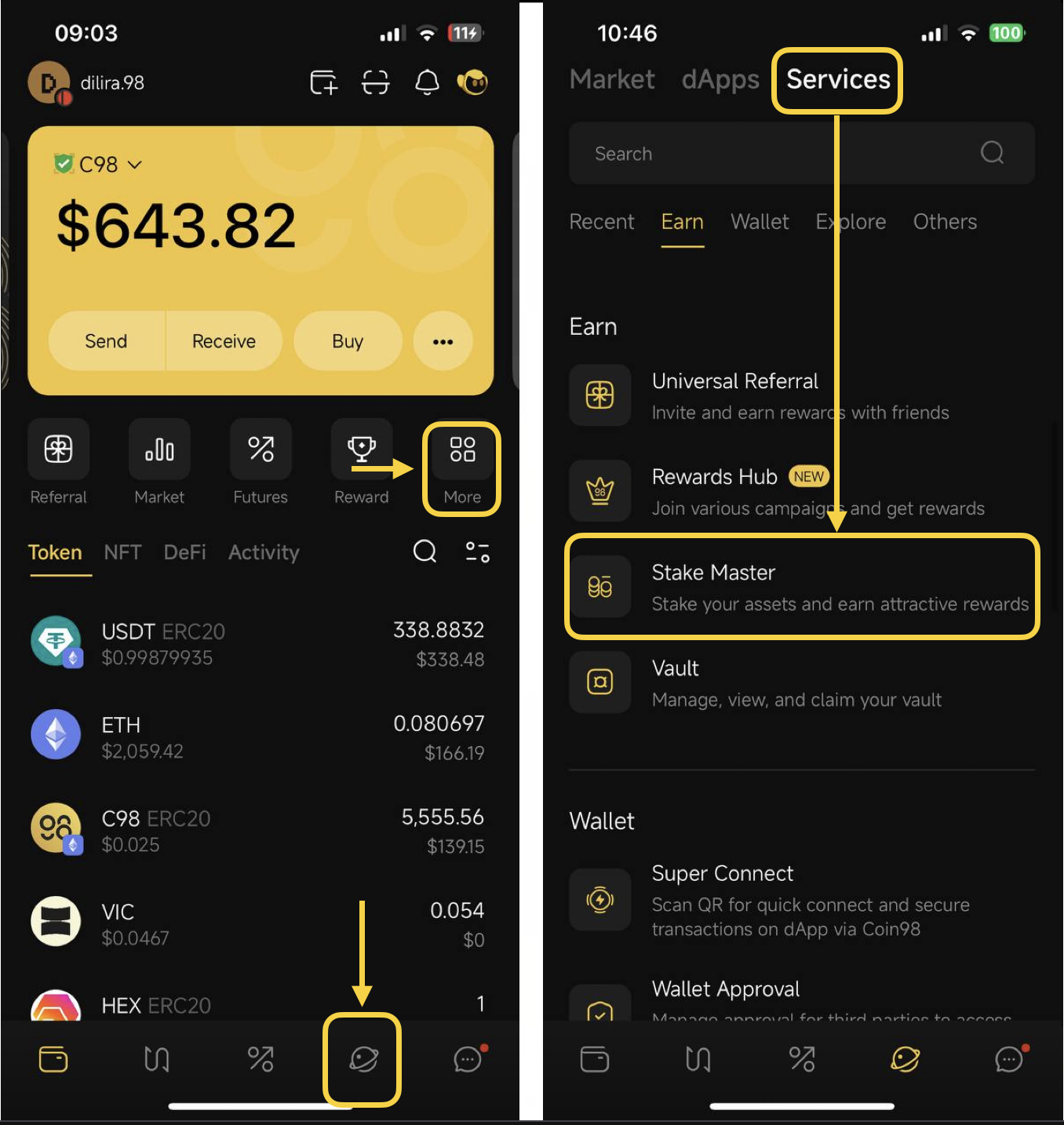
**Step 1**: Access the Stake Master feature
*Option 1:*
Click on the icon at the top left corner of the main screen ⇒ Choose **Services ⇒** Scroll down or search for Stake Master.
*Option 2:*
Click on the **More** button or the Discover icon on the main screen ⇒ Navigate to the Services tab ⇒ Scroll down or search for Stake Master
**Step 2**: Select **Coin98 PowerPool**
**Step 3:** Select the Viction chain and the wallet address containing the C98 VRC25 tokens you want to stake
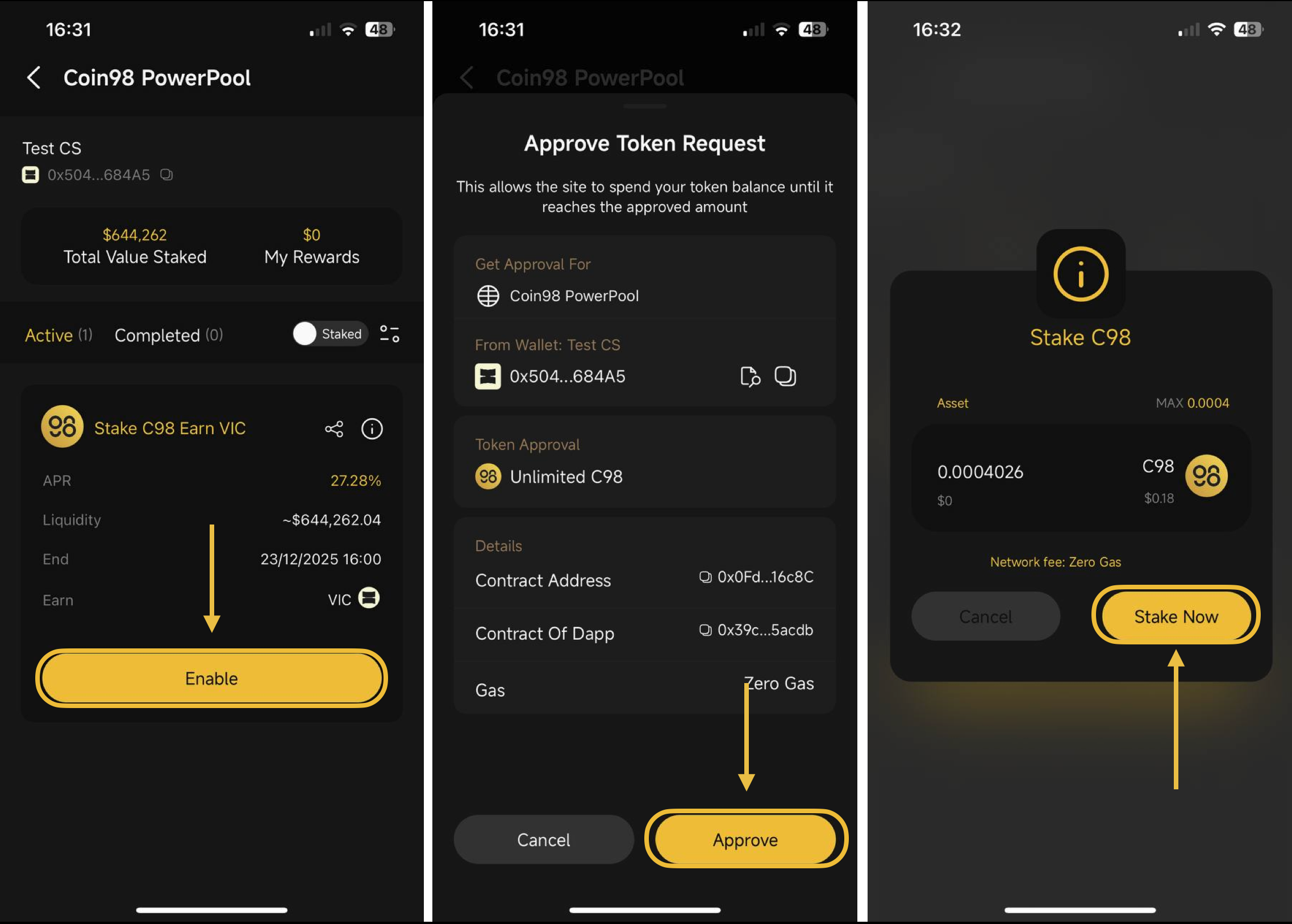
**Step 4.1 - If this is your first time staking C98 tokens on Coin98 PowerPool:**
* Select **Enable** and then click **Approve** in the **Approve Token Request** pop-up
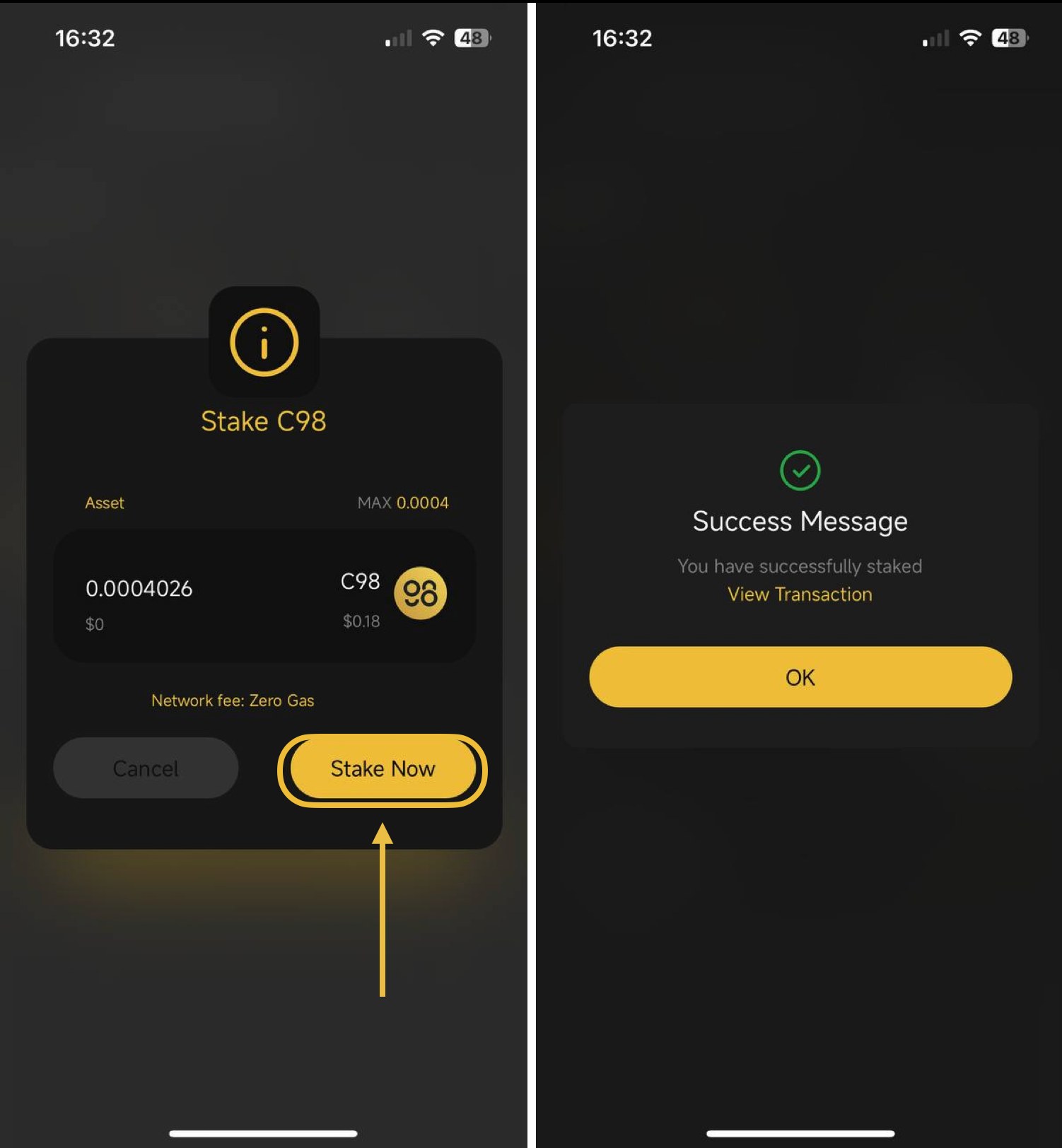
* Next, enter the amount of C98 you want to stake → then click **Stake Now**
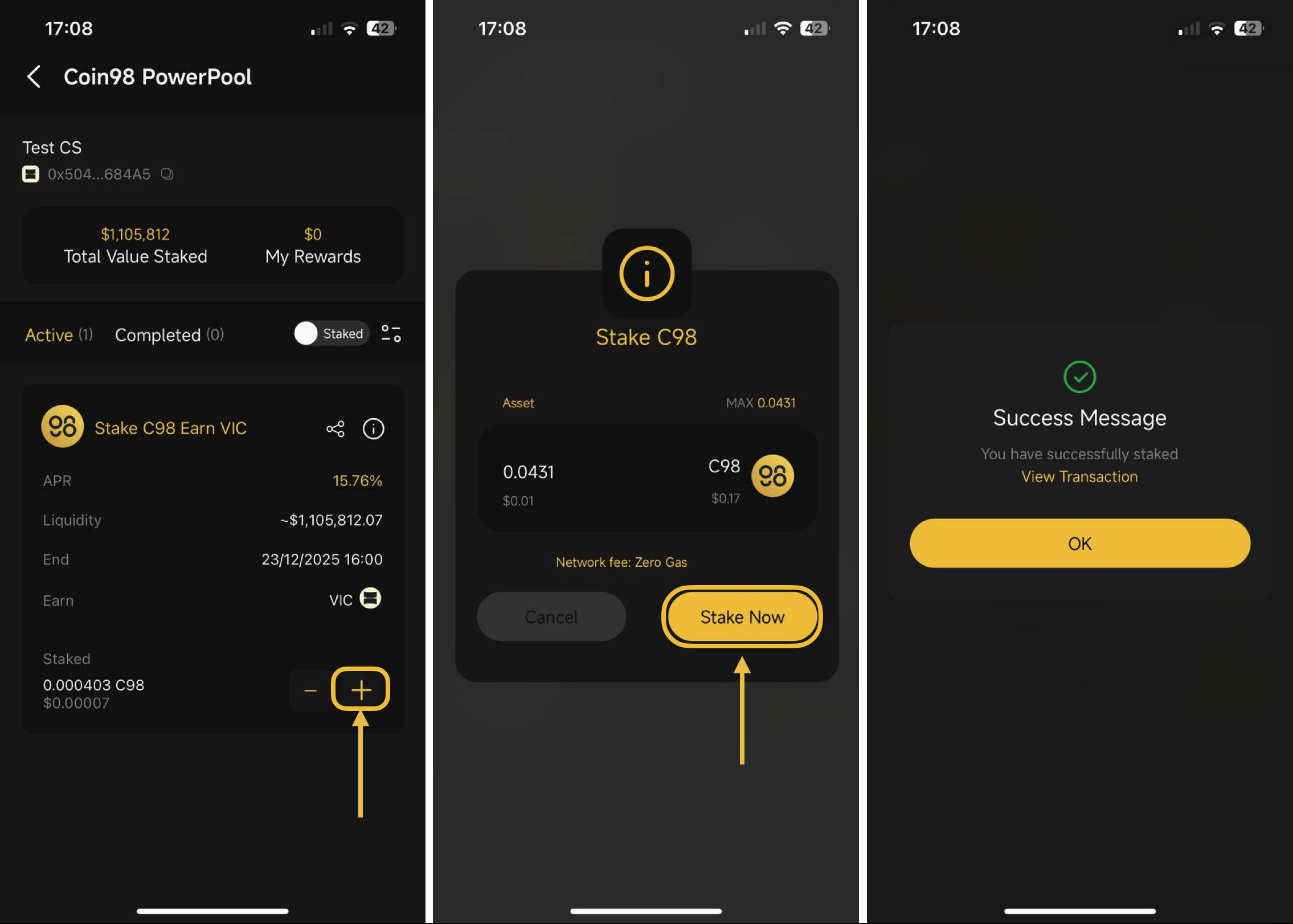
**Step 4.2 - If you want to stake additional tokens:**
* Select the '+' icon
* Then, enter the amount of C98 you want to stake → click **Stake Now**
**Step 5:** A **Success Message** will appear after you have successfully staked → click **OK**
## **How** do you harvest tokens from Coin98 PowerPool?
**Step 1:** Click the **Harvest** button
**Step 2:** Review the amount of tokens received after harvesting. If you agree, click **Confirm**
**Step 3:** A **Success Message** will appear after the harvest is successful → click **OK**
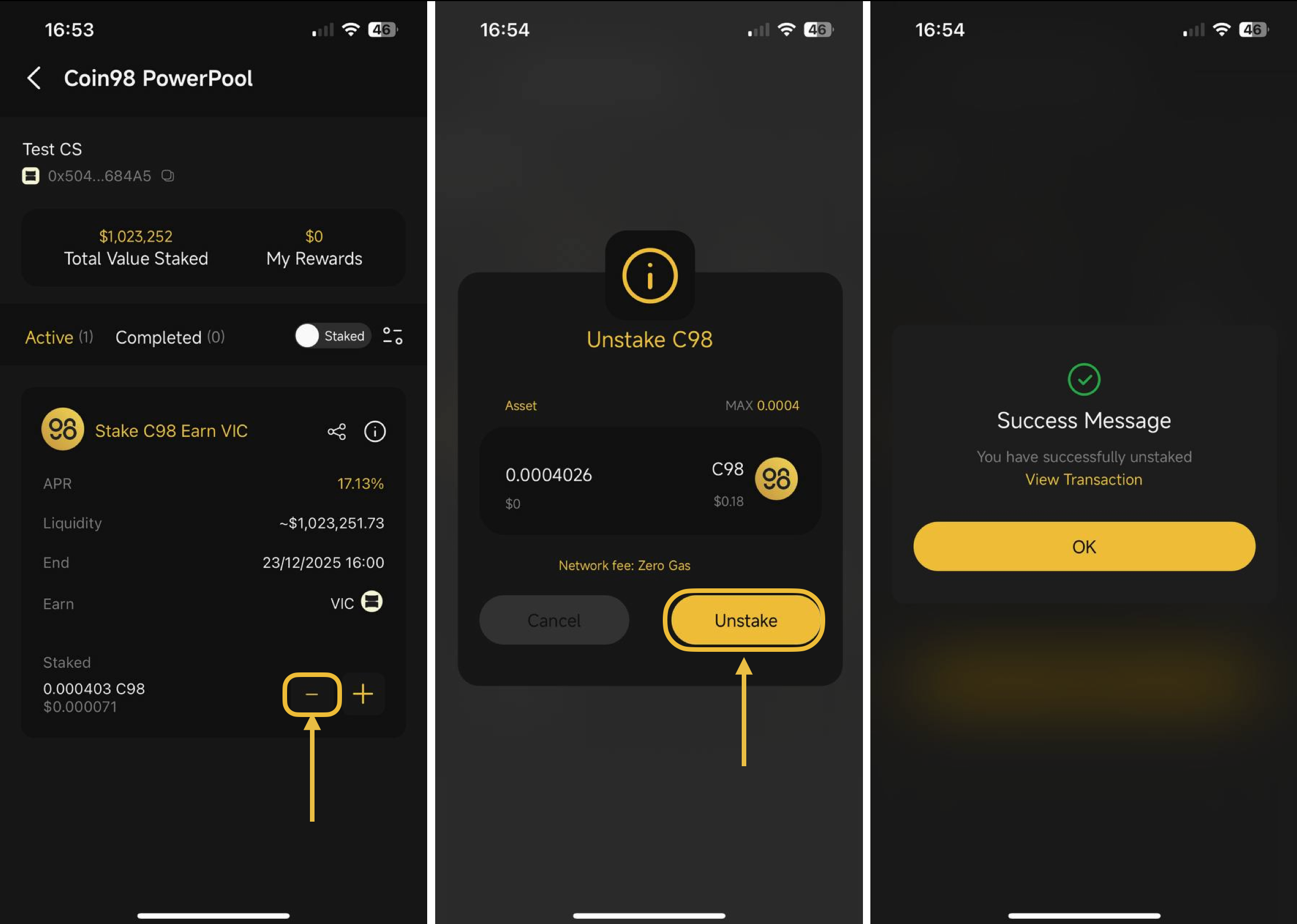
## **How** do you unstake C98 from Coin98 PowerPool?
**Step 1:** Click the **"-"** icon
**Step 2:** Enter the amount of C98 tokens you want to unstake
**Step 3:** A **Success Message** will appear after successfully unstaking → click **OK**
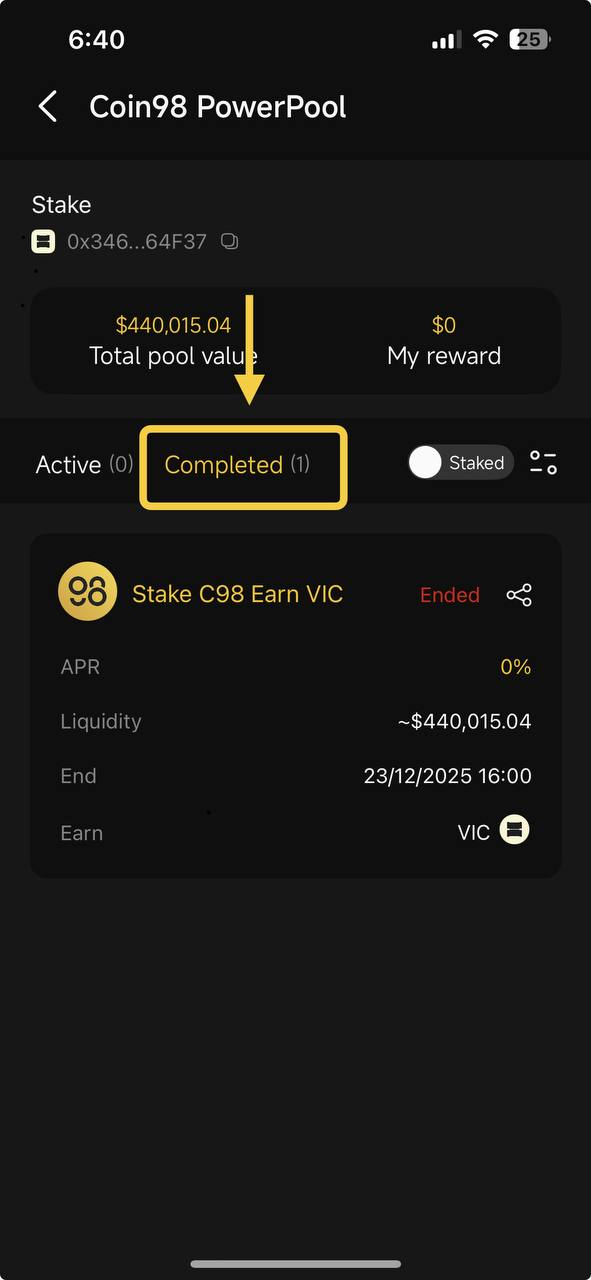
{% hint style="info" %}
Note: If the pools have ended, go to the **Completed** section to find your staked pools and unstake your tokens.
{% endhint %}
### Key Terms
* **Coin98 PowerPool:** A staking feature inside Coin98 Super Wallet for C98 VRC25 on Viction.
* **C98 VRC25:** C98 issued on the Viction network
* **CEX:** A centralized exchange such as Binance
* **Harvest:** The action used to collect available reward tokens from your stake.
* **Unstake:** The action used to withdraw staked C98 from Coin98 PowerPool.
### FAQs
#### What is Coin98 PowerPool?
Coin98 PowerPool is a staking feature inside Coin98 Super Wallet that supports staking C98 VRC25 on the Viction network.
#### Which C98 tokens can I stake on Coin98 PowerPool?
Coin98 PowerPool currently supports C98 VRC25 on the Viction network.
#### Can I stake C98 from Ethereum, BNB Smart Chain, or Solana directly?
No. C98 from other chains must first be converted to C98 VRC25 on Viction before staking. Use a CEX that supports Viction deposits and withdrawals, or use Coin98 SwapX to convert the tokens.
#### Does Coin98 PowerPool charge gas fees on Viction?
Coin98 PowerPool provides Zero Gas Fee support for staking, unstaking, and harvesting on the Viction network.
#### Do I need to approve C98 before staking for the first time?
Yes. The first stake requires an Approve action before you can enter the amount and click Stake Now.
#### Where do I find pools that have ended?
If a pool has ended, open the **Completed** section to find your staked pools and unstake your tokens.
---
# Agent Instructions
This documentation is published with GitBook. GitBook is the documentation platform designed so that both humans and AI agents can read, navigate, and reason over technical content effectively. Learn more at gitbook.com.
## Querying This Documentation
If you need additional information that is not directly available in this page, you can query the documentation dynamically by asking a question.
Perform an HTTP GET request on the current page URL with the `ask` query parameter, and the optional `goal` query parameter:
```
GET https://docs.coin98.com/products/coin98-super-wallet/mobile/coin98-staking/how-to-use-coin98-powerpool-on-coin98-super-wallet.md?ask=&goal=
```
`ask` is the immediate question: it should be specific, self-contained, and written in natural language.
`goal` is optional and describes the broader end goal you are ultimately trying to accomplish on behalf of the user. GitBook uses it to tailor the answer towards what is most useful for that goal.
The response will contain a direct answer to the question and relevant excerpts and sources from the documentation.
Use this mechanism when the answer is not explicitly present in the current page, you need clarification or additional context, or you want to retrieve related documentation sections.