> For the complete documentation index, see [llms.txt](https://docs.coin98.com/llms.txt). Markdown versions of documentation pages are available by appending `.md` to page URLs; this page is available as [Markdown](https://docs.coin98.com/products/coin98-super-wallet/mobile/wallet-health.md).
# Wallet Health
### Overview
Wallet Health is a built-in security and asset optimization tool inside Coin98 Super Wallet. It helps users review potential wallet risks, monitor wallet activity, and optimize assets in one place without relying on external tools.
No external tools. No complicated setup. Everything in one place.
### What is Wallet Health?
Wallet Health is an all-in-one wallet management dashboard inside Coin98 Super Wallet that combines security monitoring, asset optimization, and recovery tools in a single experience. Instead of relying on multiple external tools or manual checks across different platforms, users can review wallet risks, optimize assets, and take action directly within a single dashboard.
After scanning, Wallet Health consolidates the results into a Health Score (0–100) that reflects the security status of your wallets.
### What security risks does Wallet Health detect?
During everyday wallet usage, users may encounter various security risks that are often overlooked, such as:
* **Unrevoked Approvals:** dApp and token approvals do not expire automatically. Even after you stop using a platform, its access to your tokens may still remain active on-chain.
* **Risky dApp Connections:** Connecting to phishing or fake websites may leave hidden security vulnerabilities in your wallet, even after you close the site.
* **Suspicious Contacts:** Addresses that increase the chance of sending funds to the wrong address or becoming a target of scams.
### Why should wallet security be simple?
Managing wallet security manually is complicated and often requires multiple scattered steps and external tools, making it easy to overlook important risks.
To properly protect a wallet, users often need to:
* Visiting external sites such as revoke.cash, etherscan.io/tokenapprovalchecker to audit and revoke token approvals
* Manually disconnecting risky dApps through each platform’s settings
* Cross-referencing contact addresses before sending any transaction
* Tracking backup status across each wallet separately
Wallet Health simplifies the entire process by bringing everything into one screen, allowing users to scan wallets, detect risks, resolve issues instantly inside Coin98 Super Wallet, helping users identify and resolve threats before damage happens, no external tools, no missed steps.
### What does Wallet Health do?
Wallet Health performs a multi-point scan across your device and returns a Health Score along with a categorized list of detected risks. For each risk found, the app surfaces an immediate action to resolve it.
#### Security scan categories
| **Category** | **What is scanned** | **Resolution action** |
| --------------- | ------------------------------------------------------------------------------ | --------------------------------------------------------------------- |
| Wallets | All wallets on the device (Free, Pro & Ultra) | Remove risky wallets/ Transfer assets to another wallet (Pro & Ultra) |
| Contacts | All current contacts saved on the device | Remove contact |
| Connections | DApps the wallet has connected to | Revoke (disconnect) risky dApps |
| Interacted URL | A dApp that is open in the DApp browser but has not yet connected to a wallet. | Close the risky dApp tab |
| Favorite dApps | DApps marked as favorites | Remove risky dApps from favorites |
| Favorite Tokens | Tokens marked as favorites in the Market | Remove risky tokens from favorites |
| Approval | Token/NFT approvals across all wallets | Revoke risky token/NFT approvals |
| Cloud Backup | Backup status of wallets on the device | Back up to Cloud |
#### Asset optimization tools
| **Feature** | **What it does** |
| ------------------- | ------------------------------------------------------------------------------------------------------ |
| Dust Sweeper | Collects tokens with small balances (0.5 - 20$) and swaps them to native tokens |
| Recover SOL Fee | Closes empty Solana token accounts and returns SOL fees to the wallet. |
| Recover Seed Phrase | Recovers a wallet when one word is missing from the seed phrase (supports 11/14/17/20/23-word phrases) |
### Wallet Health Plans
Wallet Health is available in three tiers. Each plan supports a different set of features, as shown below:
| **Feature** | **Free** | **Pro** | **Ultra** |
| --------------------- | -------------------------- | --------------------------------------------------------------------- | --------------------------------------------------------------------- |
| Supported blockchains | BSC, ETH, BASE, AVAX, TRON | BSC, ETH, AVAX, BASE, ARBITRUM, OPTIMISM, POLYGON, SONIC, TRON, opBNB | BSC, ETH, AVAX, BASE, ARBITRUM, OPTIMISM, POLYGON, SONIC, TRON, opBNB |
| Actions | Manually | Manually | Auto-scan (24/7) + Real-time alert |
| Scan categories | 4 categories |
|
| Payment method | Free | Apple Pay / Google Pay (other options are coming soon) | Apple Pay / Google Pay (other options are coming soon) |
| Monthly credit | 500.000 credit/month | 10.000.000 credit/month | 100.000.000 credit/month |
### How to use Wallet Health
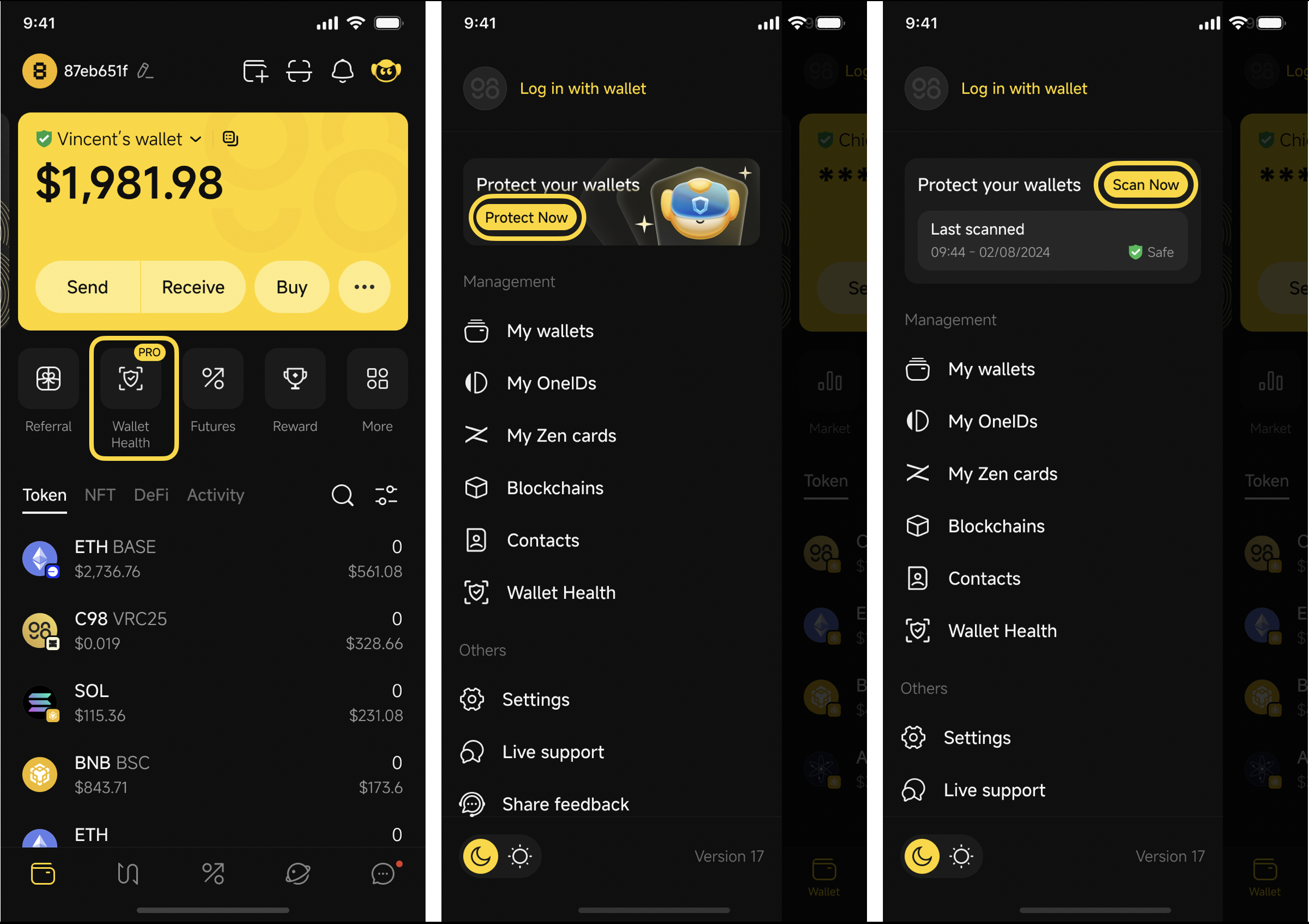
**Step 1:** Access **Wallet Health**
*Option 1*: From the Home screen
On the main screen, click **Wallet Health** → click **Scan Now** to start scanning
*Option 2*: From the Sidebar:
* If you have never scanned before: Sidebar → **Protect Now** banner to access the Wallet Health screen
* If you have a previous scan: Sidebar → **Scan Now** to re-scan and go to the main Wallet Health screen
**Step 2:** Stay on the Wallet Health screen until the scan completes.
{% hint style="danger" %}
Do not leave the screen while scanning. If you navigate away or tap Stop, the scan will not complete, and results will be incomplete.
{% endhint %}
**Step 3:** Once the scan finishes, review your Health Score and the list of risks grouped by category.
Health Score color guide:
* 🔴 0–30: High risk → resolve immediately
* 🟠 31–90: Medium risk → review recommended
* 🟢 91–100: Good standing
**Step 4:** Select the flagged items, check the risks, then take the recommended actions to resolve the risks and keep your wallet safe.
#### How to upgrade to Pro or Ultra plans
{% hint style="info" %}
**Important note:** Pro/Ultra plans are bound to the wallet address that is active at the time of upgrade. Please do not remove the bound wallet from the app to avoid losing access to your plans
{% endhint %}
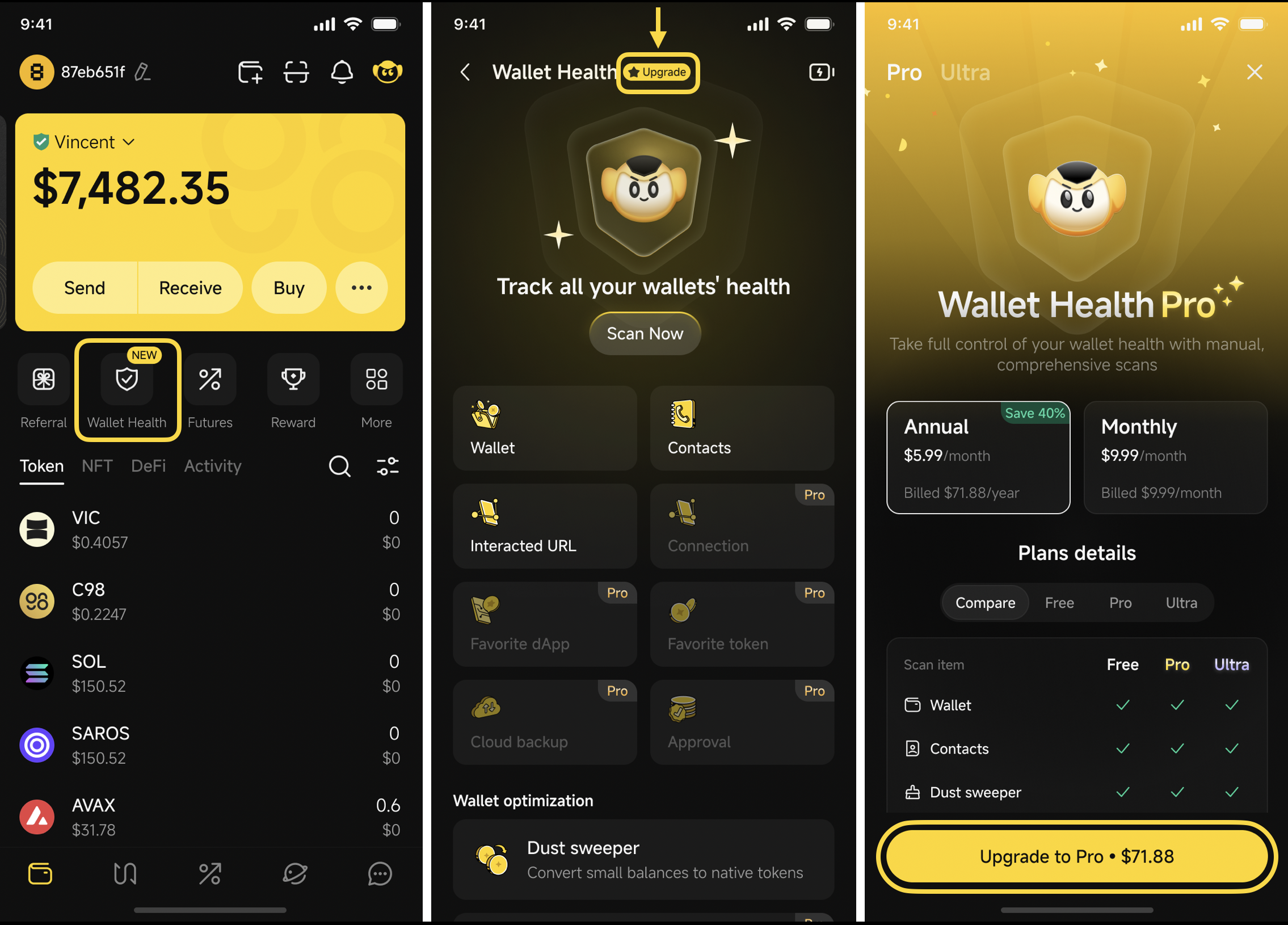
**Step 1:** Access **Wallet Health**
* Click **Upgrade** if you are using the Free plan and want to upgrade to the Pro plan
* Click **Pro** if you are using the Pro plan and want to upgrade to the Ultra plan
**Step 2:** Review the plan comparison and select **Pro** or **Ultra**.
{% hint style="info" %}
**Note:** You can select to purchase **Monthly** or **Annual** plans with extra benefits and better deals
{% endhint %}
**Step 3:** Complete payment via Apple Pay or Google Pay (other options are coming soon)
Upgrade to Pro
Upgrade to Ultra
Your new plan activates immediately after successful payment.
{% hint style="info" %}
**Note:** You can cancel your subscription at any time.
**For Montly subscriptions:**
* Your current plan will remain active until the end of the current billing month and will automatically renew based on your Apple Pay or Google Pay subscription settings.
* If a payment issue occurs, you will have a 3-day grace period to continue using your plan and remaining credits. After 3 days without a successful payment, your plan will automatically be downgraded to the Free plan.
**For Annual subscriptions:**
* Your current plan will remain active until the end of the current month.
* If you cancel during the subscription period, Apple Pay or Google Pay will provide a refund based on the remaining time on your plan.
{% endhint %}
### FAQs
#### What is Wallet Health in Coin98 Super Wallet?
Wallet Health is a built-in **security** and **utility** suite in Coin98 Super Wallet that helps you monitor and optimize your wallets. It scans for risks across wallet addresses, contacts, dApp connections, and token approvals, and lets you fix issues directly in the app. Besides, it helps you clean up small token balances (Dust Sweeper), reclaim SOL fees, and recover your seed phrase when needed (Seed Phrase Recovery tool).
#### What does Wallet Health scan?
Wallet Health scans 8 categories: wallet addresses (Wallets), saved contacts (Contacts), dApp connections (Connections), open browser tabs (Interacted URL), favorited dApps (Favorite dApps), favorited tokens (Favorite Tokens), token and NFT approvals (Approval), and wallet backup status (Cloud Backup).
#### Do I need to pay to use Wallet Health?
Wallet Health offers both free and paid plans. With the Free plan, you can manually scan selected risk categories on supported blockchains. To unlock more scan categories, more supported blockchains, resolve detected risks directly, and access advanced features like 24/7 auto-scan and real-time alerts, you’ll need to upgrade to Pro or Ultra plans.
#### How many blockchains are supported in each plan?
* **Free plan**: Supports 5 blockchains: BSC, ETH, BASE, AVAX, and TRON.
* **Pro & Ultra plan:** Support 10 blockchains: BSC, ETH, AVAX, BASE, ARBITRUM, OPTIMISM, POLYGON, SONIC, TRON, and opBNB.
#### What is the credit limit for each Wallet Health plan?
* **Free:** 500,000 credits/month
* **Pro:** 10,000,000 credits/month
* **Ultra:** 100,000,000 credits/month
#### What is a token approval and why should I revoke it?
A token approval is a permission you granted to a smart contract to access and move tokens in your wallet. These approvals remain active indefinitely on the blockchain, even after you stop using the dApp. If the contract is compromised or was a scam from the start, it can still drain your tokens at any time.
#### Is disconnecting from a dApp enough to protect my wallet?
No. Disconnecting only prevents the dApp from seeing your wallet address. If you have granted token approvals, those approvals remain active on the blockchain. You must **Revoke** them separately in the Approval category.
#### Does revoking a token approval cost anything?
Yes. Each time you revoke will execute an on-chain transaction and requires a small gas fee on the relevant network.
#### Should I sell or swap a scam token?
No. Never interact with a scam token, many contain malicious contract logic that triggers a wallet drain the moment you attempt to swap or sell. If a token is flagged as a scam, the correct action is to hide it and never touch it. You can transfer all your assets to a newly created wallet.
#### How does Dust Sweeper work?
Dust Sweeper collects all tokens with small balances between $0.5 - $20 across all your wallets and swaps them to the native token of the supported chain. Standard SwapX fees apply
***Note:** Only available for the blockchains currently supported on SwapX, including BNB Smart Chain, Base, Arbitrum, Polygon, Viction, Ethereum, Avax, Optimism. Solana and Sui will be added soon.*
#### What does the Recover SOL Fee apply to?
Recover SOL Fee applies to Solana wallets only. It closes token accounts that are no longer used but still have SOL locked as rent, and helps return SOL to your wallet.
---
# Agent Instructions
This documentation is published with GitBook. GitBook is the documentation platform designed so that both humans and AI agents can read, navigate, and reason over technical content effectively. Learn more at gitbook.com.
## Querying This Documentation
If you need additional information that is not directly available in this page, you can query the documentation by asking a question.
Perform an HTTP GET request on the following URL with the `ask` and `goal` query parameters:
```
GET https://docs.coin98.com/products/coin98-super-wallet/mobile/wallet-health.md?ask=&goal=
```
`ask` is the immediate question: it should be specific, self-contained, and written in natural language.
`goal` is what the user is ultimately trying to achieve, the reason they need the answer. Sharing it helps GitBook give you a better, more relevant answer. A goal is most helpful when it describes the outcome the user wants rather than restating the question. For example, with `ask=how do I create an API token`, a goal like `automate deployments from our CI pipeline` lets GitBook tailor the answer to that use case.
The response will contain a direct answer to the question and relevant excerpts and sources from the documentation.
Use this mechanism when the answer is not explicitly present in the current page, you need clarification or additional context, or you want to retrieve related documentation sections.