> For the complete documentation index, see [llms.txt](https://docs.coin98.com/llms.txt). Markdown versions of documentation pages are available by appending `.md` to page URLs; this page is available as [Markdown](https://docs.coin98.com/vn/san-pham/coin98-super-wallet/mobile/universal-referral-program/cach-nhan-thuong-tu-universal-referral.md).
# Cách nhận thưởng từ Universal Referral
Universal Referral cho phép bạn kiếm hoa hồng từ các hoạt động của những người bạn mời. Trong hướng dẫn này, bạn sẽ biết cách nhận phần thưởng trực tiếp từ ứng dụng.
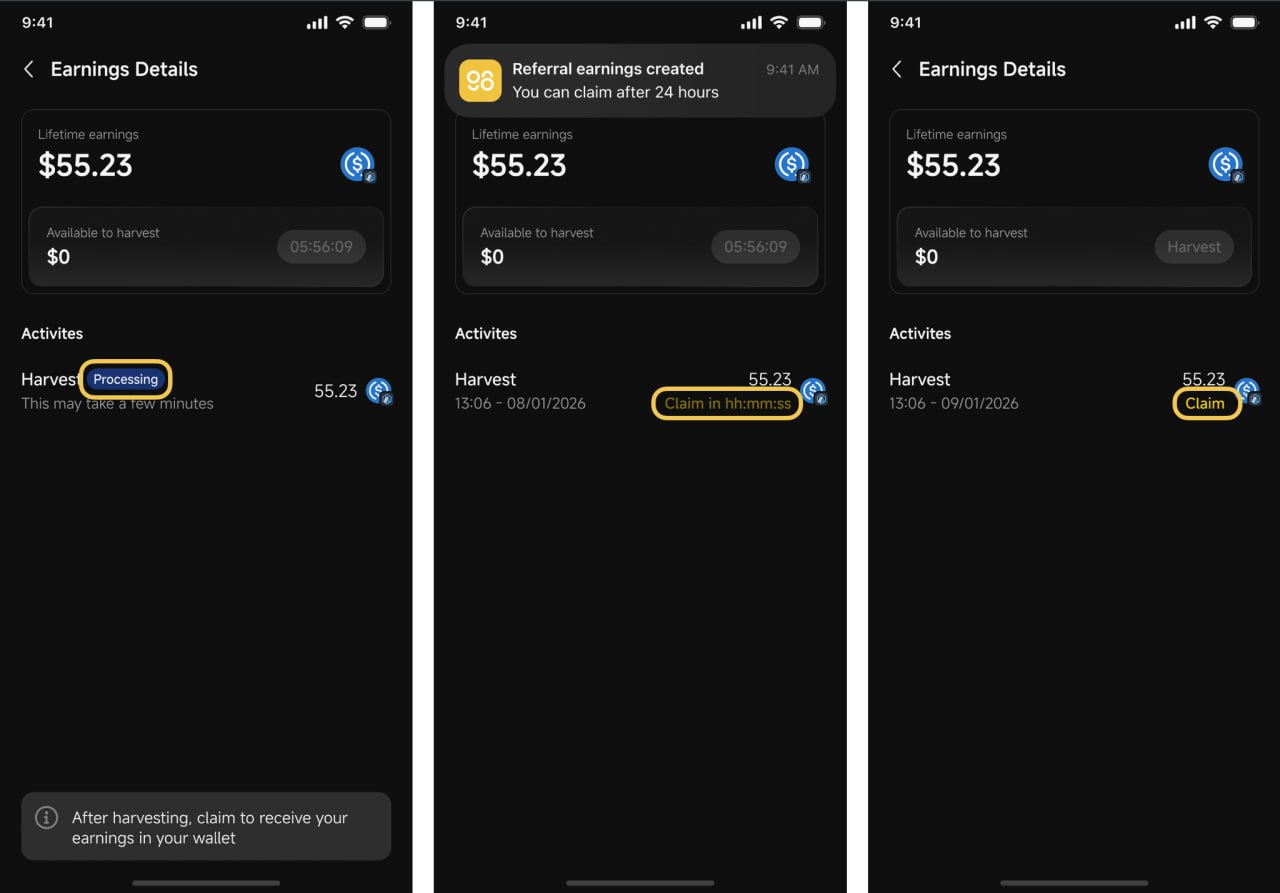
Để nhận phần thưởng về ví của mình, bạn cần hoàn thành hai hành động chính: Harvest (mỗi 6 giờ) và Claim (sau 24 giờ).
Hãy làm theo các bước dưới đây để claim thu nhập referral của bạn thành công.
**Bước 1:** Nhấn vào **Referral** trên màn hình Home để truy cập màn hình **Universal Referral**, sau đó nhấn **Thu nhập trọn đời (Lifetime Earnings)** để mở trang chi tiết.
Tại đây bạn có thể xem toàn bộ thông tin referral, bao gồm tổng thu nhập, số tiền có thể harvest, và lịch sử hoạt động.
**Bước 2:** Nhấn **Harvest** trong mục **Available to harvest** khi tính năng này khả dụng.
{% hint style="info" %}
**Lưu ý:** Bạn chỉ có thể Harvest mỗi 6 giờ một lần. Nếu chưa hết thời gian chờ, bộ đếm thời gian (hh:mm:ss) sẽ hiển thị trên giao diện
{% endhint %}
**Bước 3:**\
Yêu cầu Harvest của bạn sẽ ở trạng thái **Processing**, sau đó chờ cho đến khi hệ thống tạo yêu cầu claim và hiển thị **Claim** trong thời gian đếm ngược (hh:mm:ss).
{% hint style="info" %}
**Lưu ý:** Bạn cần chờ 24 giờ trước khi có thể claim. Thời gian còn lại chính xác sẽ được hiển thị trong ứng dụng.
{% endhint %}
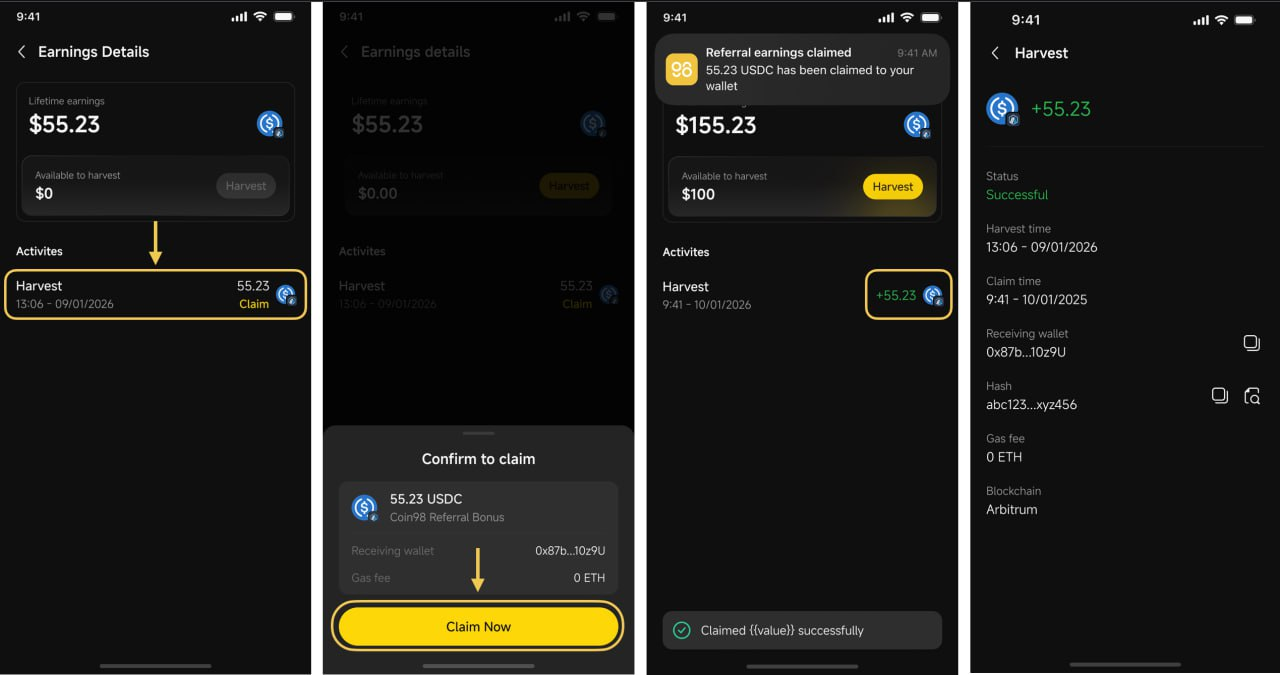
**Bước 4:** Khi đếm ngược kết thúc, nhấn **Claim** và kiểm tra chi tiết claim (số lượng, ví nhận, phí gas, mạng), sau đó nhấn **Claim Now** để xác nhận và chờ giao dịch hoàn tất.
{% hint style="info" %}
**Lưu ý:** Token nhận được sẽ là USDC trên mạng Arbitrum, vì vậy hãy đảm bảo bạn đã chuẩn bị ETH trên Arbitrum để trả phí gas.
{% endhint %}
---
# Agent Instructions
This documentation is published with GitBook. GitBook is the documentation platform designed so that both humans and AI agents can read, navigate, and reason over technical content effectively. Learn more at gitbook.com.
## Querying This Documentation
If you need additional information that is not directly available in this page, you can query the documentation by asking a question.
Perform an HTTP GET request on the following URL with the `ask` and `goal` query parameters:
```
GET https://docs.coin98.com/vn/san-pham/coin98-super-wallet/mobile/universal-referral-program/cach-nhan-thuong-tu-universal-referral.md?ask=&goal=
```
`ask` is the immediate question: it should be specific, self-contained, and written in natural language.
`goal` is what the user is ultimately trying to achieve, the reason they need the answer. Sharing it helps GitBook give you a better, more relevant answer. A goal is most helpful when it describes the outcome the user wants rather than restating the question. For example, with `ask=how do I create an API token`, a goal like `automate deployments from our CI pipeline` lets GitBook tailor the answer to that use case.
The response will contain a direct answer to the question and relevant excerpts and sources from the documentation.
Use this mechanism when the answer is not explicitly present in the current page, you need clarification or additional context, or you want to retrieve related documentation sections.